Make to stock
Produce to a forecast and sell from finished goods, so customers get delivery from the shelf.
For example: packaged food, FMCG, building products
Plans from forecasts, reorder levels and safety stock on finished goods
Manufacturing BOMs, production, quality, costing
Plan production from real orders, run the shop floor on work orders and job cards, check quality at every gate and know what each unit cost to make. Purchase, stock, GST, accounts and your sales and service teams work on the same records.
Types of manufacturing
Most factories mix two or three of these. We set BeatOS ERP up for the way each of your product lines is actually made.
Produce to a forecast and sell from finished goods, so customers get delivery from the shelf.
For example: packaged food, FMCG, building products
Plans from forecasts, reorder levels and safety stock on finished goods
Nothing is made until the customer orders, and every order has a promised date.
For example: pumps, control panels, machined parts
Work orders straight from sales orders, with stock and capacity checked first
Each order is designed for the customer, so the BOM is drawn up per job.
For example: special machines, fabrication, plant equipment
A project per order, its own BOM, and every cost charged to that project
Countable units built from parts and sub-assemblies, often with a serial number each.
For example: electricals, auto components, furniture
Multi-level BOMs, serial numbers and warranty history per unit
Made in lots from a recipe, where every batch must be traceable and checked.
For example: chemicals, paints, pharma, food
Batch BOMs, batch numbers with expiry, and a quality check on every batch
Continuous production from bulk raw material, where yield and loss decide the margin.
For example: polymers, edible oil, textile processing
Process loss, scrap and by-products recorded, and yield tracked per run
The same products run on dedicated lines, day after day, at a steady rate.
For example: packaging, castings, components
Standard routings, workstation capacity and daily output against plan
Tell us how one product moves through your factory. We will map it in the first study.
How we study your process →The building blocks
Six records describe how your factory works. After that, planning, costing and the shop floor all read from them.
One order, end to end
An example from a make-to-order pump maker. Each step creates a linked record, so anyone can open the order and see exactly where it stands.
A dealer orders 200 pumps for the 30th, from the office or the rep's phone.
The plan opens the multi-level BOM and works out the motors to make and the material to buy.
Anything short after counting stock, orders and reservations goes to purchase.
Copper wire is ordered with approval and received with an incoming check; rejects go to a separate store.
Castings go to a machining job worker; their stock is tracked until the bodies come back.
Material for each work order moves from stores to work in progress.
Motors are wound and varnished first, as a sub-assembly with its own work order.
Each operation is logged at its workstation, with time and operator, so delays show the same day.
Pumps are assembled, then pressure-tested against limits before they are accepted.
Each pump enters stock with its own serial number, for warranty and service later.
Delivery note, GST e-invoice and e-way bill go out together.
Actual cost per pump is compared with the plan; service visits later find the pump by serial.
Making something different?Batch and process plants follow the same chain, with batch numbers, process loss and yield in place of serial numbers.
Planning
Stock on the shelf is only half the answer. BeatOS ERP works out projected stock: what you have, plus what is coming, minus what is already spoken for.
ReorderBelow the reorder level of 400 kg. A material request for 600 kg has been raised.
Quality
Mark an item as needing inspection, and nothing moves past that point until it is checked and recorded.
Raw material checked on receipt against its template, with sample size and readings.
Checks between operations, so a fault is caught before more value is added.
Finished goods tested before they enter stock or leave with a delivery.
Every batch and serial number traced from the supplier's lot to the customer's invoice.
Reports
Every report reads the records the shop floor writes, so it is current without anyone compiling it.
BeatOS ERP for manufacturers
The factory, the stores and the accounts work on the same orders the sales team books.
Multi-level BOMs, production plans from sales orders, work orders and job cards.
Raw material, WIP and finished goods by godown, batch and serial number.
Material requests from the plan, supplier quotes, approved orders and receipts.
Cost per unit, GST invoices with e-way bills, and books updated as you dispatch.
Sales and service
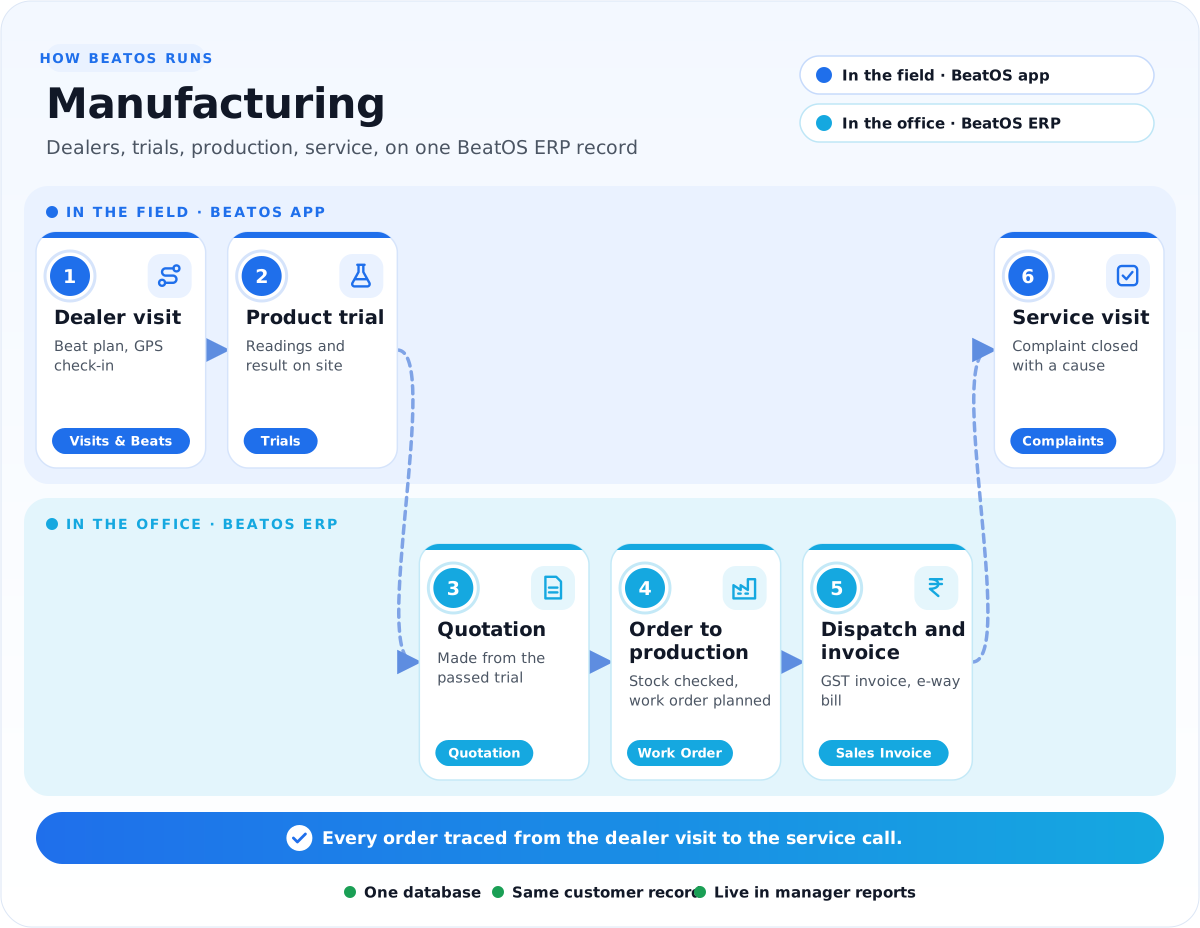
Dealer visits, product trials and service calls happen in the BeatOS app, and land on the same orders, items and serial numbers the factory uses.
Challenges and solution
Read it left to right: the problems we hear most, what we set up in BeatOS ERP, and what your field team gets.
1The challenge
Where time is lost today
2We set up BeatOS ERP
One record for the whole factory
3BeatOS adds in the field
What your team does on the phone
The resultEvery order traced from the dealer visit, through the shop floor, to the service call.
The apps
Start with the apps that fix your biggest problem, and switch on more later. Click an app to see it in detail.
Specialised setups
We have deeper setups for these trades, with their own forms, reports and workflows.
How we implement
Six steps, run by the BeatOS team with yours. We start by walking one product through your factory, then set up the records above around it.
FAQ
Tell us how one product moves through your factory, and we will show it running in BeatOS ERP.
Book a demo →Make to stock, make to order, engineer to order, discrete assembly, batch, process and repetitive production. Most factories mix a few, and each product line is set up the way it is actually made.
Yes. Multi-level BOMs let a sub-assembly have its own BOM and work order, and the production plan works out every level for you.
Yes. A production plan pulls in open sales orders or a forecast for a period, then creates the work orders and material requests for everything that is short.
Yes. Material sent to a job worker is tracked at their end, and the finished goods are received against a subcontracting order with the service charge billed.
From the BOM: materials at your chosen rate, operation time at each workstation's hourly cost, and any overheads. Actual cost from each work order is compared with the plan.
Yes. Sales orders, projected stock and work orders are in the same BeatOS ERP, so the rep and the office see the same availability.
Yes. Trials are planned, run and approved in BeatOS, with readings and results, and a passed trial becomes a quotation.
Yes. If it is compatible, BeatOS installs on your existing site and works on your customers, items and stock. If not, we move your data into BeatOS ERP.
Related industries
Bring one product and its BOM. We will show it planned, made, checked and costed.