Schools
Classes, sections and academic years, with term-wise fees and promotion to the next class each year.
Class-wise fee structures, attendance, report-card grades
Education Admissions, students, fees, exams
For schools, colleges, coaching institutes and training academies. Admissions, student records, timetables, attendance, fees, exams and a student portal, with staff, payroll and accounts on the same system.
Who it is for
Classes and sections, semesters and credits, batches and short courses: the same building blocks are set up around how your institute actually runs.
Classes, sections and academic years, with term-wise fees and promotion to the next class each year.
Class-wise fee structures, attendance, report-card grades
Programmes, semesters and elective courses, with exams by course and results by semester.
Programme enrolment, course schedules, grading rules
Batches that start every month, with enquiries chased hard and fees in instalments.
Enquiry follow-up, batches, monthly fee schedules
Short courses with practical assessments, often across several centres.
Course batches, assessments, centre-wise reports
Programmes sold to companies and individuals, with trainers scheduled across clients.
Instructor schedules, invoicing to companies, feedback
One trust or company running many schools or centres, each with its own fees and books.
Campus-wise accounts, combined reports, shared staff
Key features
Admissions, academics and money on one student record, so nobody copies a name from one register into the next.
Enquiries from the website, walk-ins and fairs followed up, then applications on your own form and admission in bulk.
Each admitted student gets a record with their details, guardians, documents and history, created from the application.
Programmes made of courses, students enrolled and split into batches or sections for each academic year.
Instructors assigned to courses, with days, times and rooms for every class, and changes when plans move.
Marked by batch or by class from any screen, with absentees visible the same day.
Fee structures by year and course, with discounts and instalments, paid online and posted to the books by themselves.
Exam schedules by date, time and hall, grades worked out from marks by your rules, and promotion in one step.
Students see their courses, timetable, attendance and grades, apply for leave and pay fees online.
One student's year
An example from a school admitting students to Class 11. Each step adds to the same student record, so the office, the teachers and the accounts see the same thing.
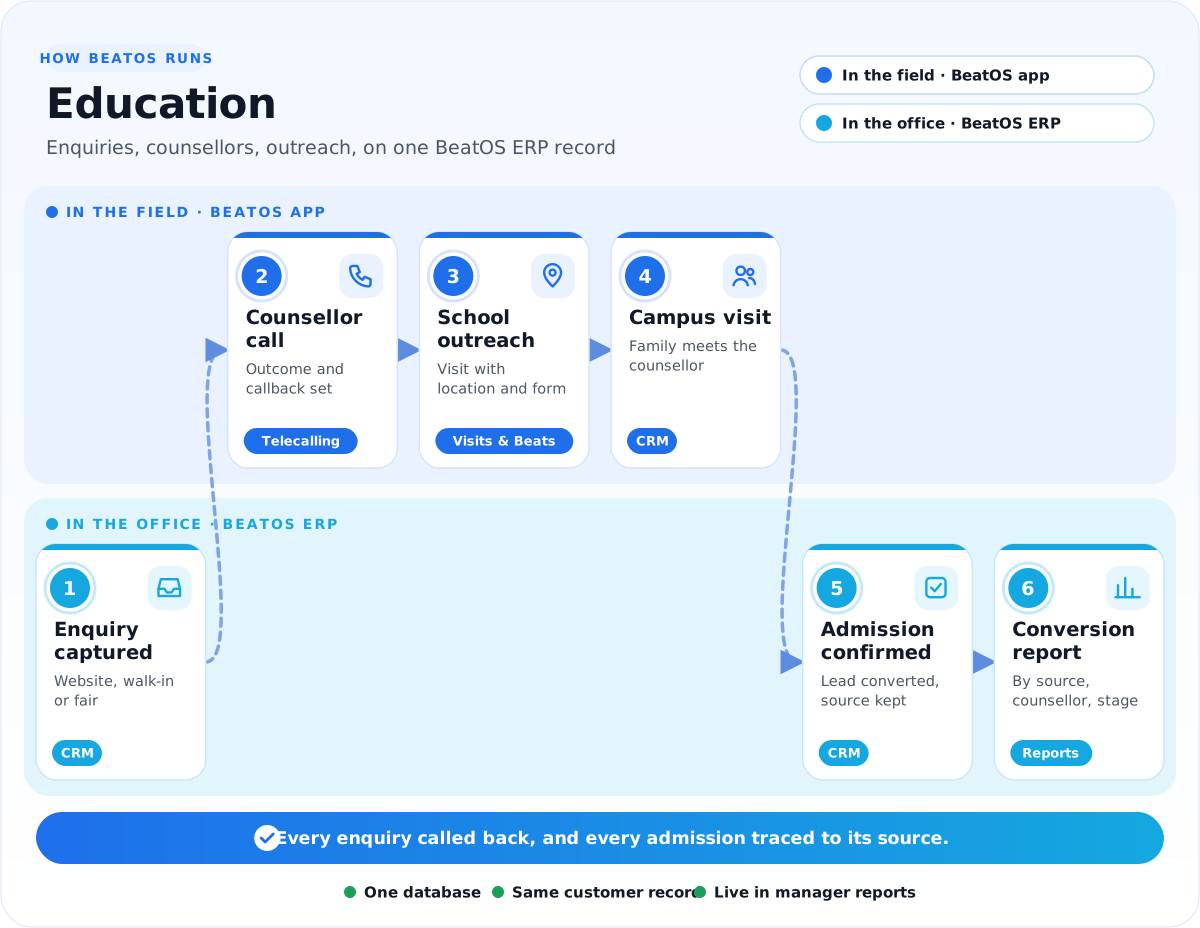
A parent fills in the website form; the enquiry goes to a counsellor's calling list with its source.
Every call ends with an outcome and a callback; the family visits and meets the counsellor.
The application on your form is reviewed, and accepted students are admitted together.
The student is enrolled in Class 11 Science with its courses for the year.
Students are placed in sections and lab batches, ready for the timetable.
The year's fees, any sibling discount and the term-wise schedule are applied to the whole section at once.
Each course gets its teacher, days, times and room; changes reach students on the portal.
Teachers mark attendance by section; absentees are visible the same morning.
The student applies for leave online, and it is approved and recorded against attendance.
Term fees are paid on the portal; the receipt is issued and the books update by themselves.
Exams are scheduled by date and hall; marks become grades by your grading scale.
Results are released on the portal, and the class is promoted to Class 12 in one step.
Running batches instead of classes?Coaching and training institutes follow the same chain, with a new batch, fee schedule and assessment for each intake.
Fees
Set the fee structure once for a class or course. BeatOS ERP applies it to every student, raises each instalment on time, takes payment online and posts it to the books.
ReminderTerm 2 is due in 7 days. 38 students have been reminded on the portal.
Student portal
Fewer calls to the office, because students can check for themselves. The portal reads the same records the staff work on.
Reports
Live, by campus, programme, class and month, without anyone compiling a register.
BeatOS ERP for institutes
The admissions team, the academic office, HR and accounts work on one system with the counsellors' calls and visits.
Enquiries as leads with stages, sources and follow-ups, through to admission.
Fee invoices and payments posted to the books, with budgets by campus or department.
Teaching and other staff records, attendance, leave and salary with PF, ESI and PT.
Purchases with approvals, and stores for books, uniforms, lab material and supplies.
Admissions outreach
Calls, school visits and fair stalls happen in the BeatOS app, and every enquiry lands in the same admissions pipeline the office works from.
Challenges and solution
Read it left to right: the problems we hear most, what we set up in BeatOS ERP, and what your counsellors get in the field.
1The challenge
Where time is lost today
2We set up BeatOS ERP
One record for the whole institute
3BeatOS adds in the field
What counsellors do on the phone
The resultEvery enquiry followed up, every fee accounted for, every result on time.
The apps
Start with the apps that fix your biggest problem, and switch on more later. Click an app to see it in detail.
How we implement
Six steps, run by the BeatOS team with yours. We usually go live before an admission season or at the start of an academic year.
FAQ
Tell us how your admissions and fees work today, and we will show it running in BeatOS ERP.
Book a demo →Yes. Student records, programmes and courses, batches, timetables, attendance, fees and exams run in BeatOS ERP, alongside admissions, staff and accounts.
Yes. The application form is set up with the fields you need, and accepted students can be admitted together in one step.
Yes. Fee structures can be split monthly, termly or yearly, with sibling, merit or staff discounts, and assigned to a whole class at once.
Yes. Fees can be paid online through the student portal, the receipt can be downloaded, and the payment is posted to the books.
Yes. Set your grading scale once, enter marks, and grades are worked out by your rules. Results are then released on the portal.
Yes. After results, students can be promoted to the next class or semester together.
Yes. Enquiries become leads with their source, and go straight into a counsellor's calling list.
Yes. Every call ends with an outcome and a callback time, and the callback comes back on time.
Related industries
Bring one class and its fee structure. We will show it admitted, enrolled, billed and assessed.