Purchase from principals
Orders raised from reorder levels, approved by amount and received by batch into the right godown.
- Reorder-driven buying
- Landed cost on every receipt
- Purchase returns
Distribution Buy, stock, sell, collect
For distributors, stockists, C&F agents and wholesalers. Buy from principals, keep stock by godown and batch, apply schemes and credit limits on every order, bill with GST and collect on time, with your salesmen in the market on the same records.
Key features
From the purchase order to the principal to the payment from the last outlet, every step is a linked record on one database.
Orders raised from reorder levels, approved by amount and received by batch into the right godown.
Every depot, godown and van as its own location, with transfers and projected stock.
Batch numbers with expiry dates, picked first-expiry-first-out so stock is sold before it dates.
Rates by customer group, slab discounts and free-item schemes applied on every order.
A credit limit and payment terms for every outlet, with orders held when the limit is crossed.
Orders taken at the billing desk, by phone, or by salesmen in the market on the BeatOS app, even offline.
Invoices with the right tax split, e-invoice IRN and e-way bill, printed the way your customers expect.
Outstanding by outlet and invoice, followed up by call or visit, and payments matched bill by bill.
One order, end to end
An example from an FMCG distributor. Each step creates a linked record, so stock, money and GST always agree.
Six items fall below their reorder level at the Pune godown, and a request is raised by itself.
The purchase order is approved by amount and sent to the company's depot.
Goods come in by batch and expiry; freight and unloading are added to the item cost.
The salesman takes the order on his beat, with the outlet's price list and stock in hand.
The 10 + 1 scheme applies by itself; an outlet over its limit is held for approval.
Confirmed orders reserve stock, so the next salesman sees what is really free to sell.
A pick list sends the godown to the oldest batch first, route by route.
The delivery note goes out with the vehicle number and e-way bill.
Billed the same day with the batch on each line and the e-invoice IRN.
Overdue bills are called or visited; the salesman sees what each outlet owes before he walks in.
Payments are matched invoice by invoice; damaged or expired goods come back on a credit note.
Gross profit by brand, outlet and salesman, worked out from real landed cost.
Selling to projects or institutions?The same chain handles quotations, phased deliveries and longer credit terms.
Inventory
Money in a distribution business is mostly stock. BeatOS ERP shows which brands are moving, which are slow and which are about to run out or expire, godown by godown.
| Brand | Stock value | Days of stock | Status |
|---|---|---|---|
| Brand A · Biscuits | ₹ 8,40,000 | 18 | Healthy |
| Brand B · Edible oil | ₹ 6,12,000 | 6 | Reorder |
| Brand C · Detergent | ₹ 3,96,000 | 64 | Slow |
| Brand D · Snacks | ₹ 46,000 | 21 | Near expiry |
Why an ERP
Billing software prints invoices. An ERP runs the business around them: what to buy, what to push, who to chase and what you actually earned.
Stock, sales, purchases and money on one screen, by godown, brand, salesman and outlet.
The salesman's order becomes the pick list, the invoice and the ledger entry without being keyed again.
Add a godown, a new principal, more salesmen or a second firm without changing systems.
The right price, fewer short supplies and faster delivery keep retailers ordering from you.
Margins, ageing and stock health are current every morning, not after the month is closed.
Start with billing, stock and collections, and switch on more modules as the business grows.
Reports
Reports read live records, so the owner sees today, not last month.
BeatOS ERP for distributors
The depot, the billing desk and the salesmen in the market share the same stock, prices and credit limits.
Orders to principals and suppliers, receipts by batch, and freight added to cost.
Stock in every godown with batch and expiry, transfers and pick lists.
Price lists, slab discounts, free-item schemes and credit limits on every order.
GST invoices with IRN, e-way bills, and overdue followed up invoice by invoice.
In the market
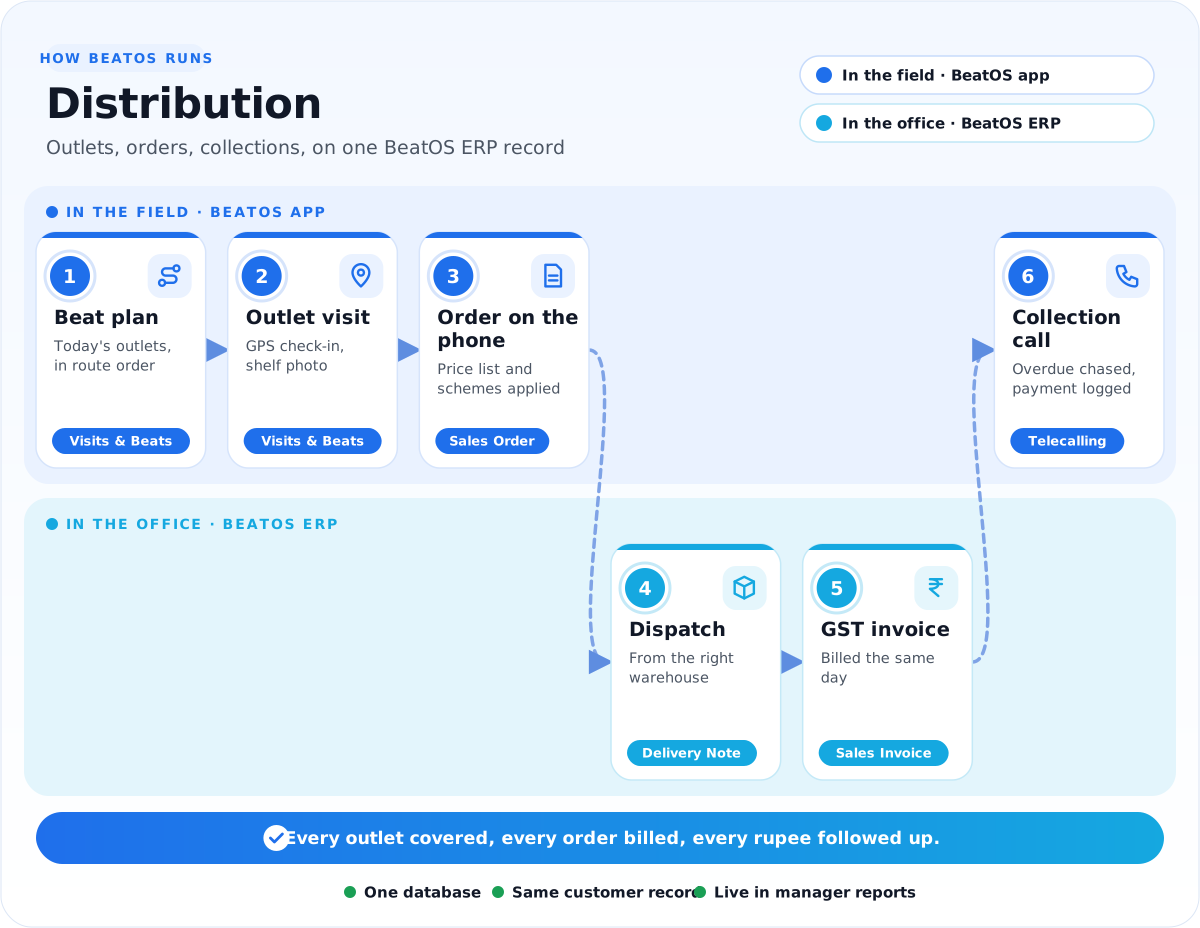
Beat plans, outlet visits, orders and collection calls happen in the BeatOS app, and land on the same stock, prices and outstanding the office sees.
Challenges and solution
Read it left to right: the problems we hear most, what we set up in BeatOS ERP, and what your salesmen get.
1The challenge
Where money leaks today
2We set up BeatOS ERP
One record for the whole depot
3BeatOS adds in the market
What your salesmen do on the phone
The resultEvery outlet covered, every order billed right, every rupee followed up.
The apps
Start with the apps that fix your biggest problem, and switch on more later. Click an app to see it in detail.
Specialised setups
We have deeper setups for these trades, with their own forms, reports and workflows.
How we implement
Six steps, run by the BeatOS team with yours. We start with your item list, godowns and schemes, and move your billing across without stopping the depot.
FAQ
Tell us how your depot works today, and we will show it running in BeatOS ERP.
Book a demo →Yes. Each godown, depot or van is its own location with stock, value and transfers, and reports show each one or the total.
Yes. Customer-group rates, slab discounts and free-item schemes apply on orders and invoices, at the billing desk and on the salesman's phone.
Yes. Every outlet has a credit limit and payment terms, and orders above the limit are held until someone approves them.
Yes. Items can be batch-wise with expiry dates, picking follows first-expiry-first-out, and near-expiry stock is reported in time to sell or return it.
Yes. The IRN and e-way bill are generated from the invoice or delivery note, with the vehicle and transporter details.
Yes. Freight and unloading are added to item cost on receipt, and the gross profit report shows margin by brand, outlet and salesman.
Yes. Orders, visits and payments are saved on the phone and sent when the network returns, with their real time and place.
Yes. Planned against visited outlets, by salesman and territory, every day.
Related industries
Bring your item list and one month of sales. We will show stock, schemes, credit and margins on it.